for employees
DailyPay is the future of employee pay. It’s an employer-integrated On-Demand Pay platform that provides a toolbox of financial wellness features like On-Demand Pay, which allows employees to access their earned pay ahead of payday (fee may apply) instead of waiting for payday. It’s easy to sign up, optional to use, and offered through a partnership with your employer.
Security is at the heart of everything we do. Your personal and financial data is protected using bank-grade 256-bit encryption and rigorous SOC 2 compliance standards, ensuring your information stays secure at every step. Our systems undergo regular security audits and assessments. We’re constantly monitoring, auditing, and improving our systems to ensure optimal data safety and security, and we obtain independent and impartial assessments to validate the reliability of our security controls.
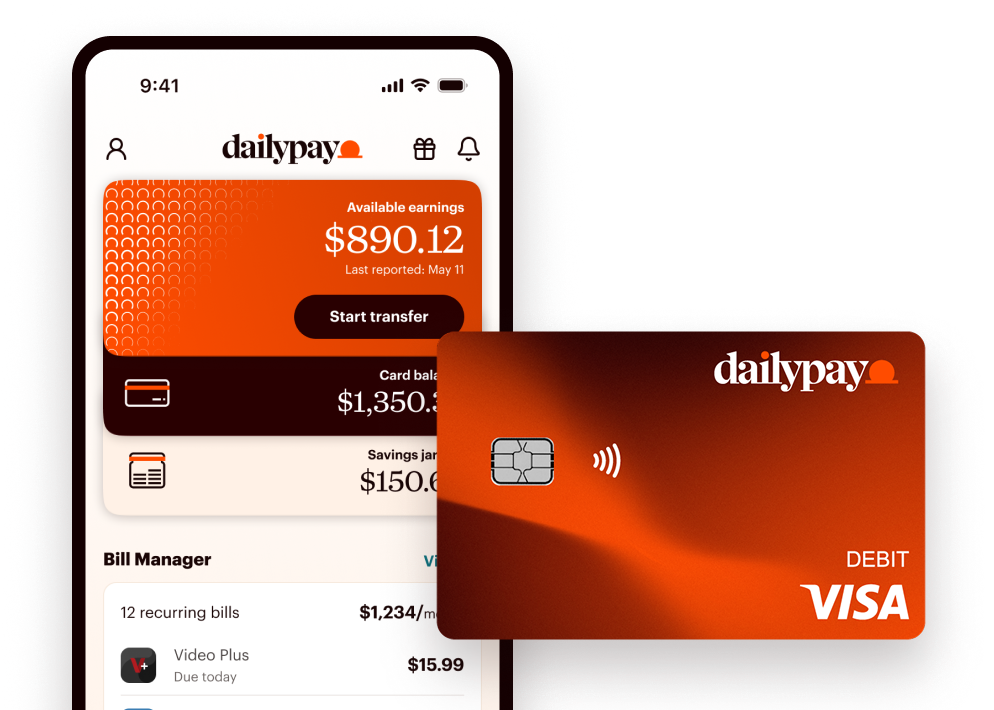
DailyPay gives you greater financial control over your earnings so you have options when making financial decisions. Our suite of financial wellness features includes The DailyPay Visa® Prepaid Card, Cash Backs¶ rewards, Savings Jars, Bill Manager,¹ as well as Credit Health, and Perks. We’re always listening and updating our platform to provide you with the latest tools to help you reach your financial goals.
¶Cash Back rewards earned on qualifying purchases will generally be transferred to your Card Account within 49 days after the qualifying purchase is settled. If you close your Card Account, any earned Cash Back rewards not yet transferred to your Card Account will be forfeited. See the DailyPay Cash Back Program Terms & Conditions for full details.
¹ Bill Manager services are provided in conjunction with a third party, ScribeUp, a DailyPay Partner. ScribeUp will only identify transactions in accounts that are integrated into the service by you. Enrollment is subject to the third party Privacy Policy and Bill Manager program terms and conditions.
Remainder Pay is the regularly scheduled pay that you receive in your bank account, on your debit card or on your pay card on your regular payday, minus any amount(s) (and applicable fees) that you transferred before payday with DailyPay.
DailyPay is available to more than 2,000 companies. More than 6 million employees have had the ability to access DailyPay. Ask your payroll or human resources department if your company offers DailyPay. If you would like DailyPay at your company, refer your human resources department to dailypay.com.
It’s your money. You should be able to access it whenever you need. Pay cycles don't always line up with when bills are due and should never be the reason why you can’t pay a bill or enjoy yourself. With DailyPay you can:
¶ Cash Back rewards earned on qualifying purchases will generally be transferred to your Card Account within 49 days after the qualifying purchase is settled. If you close your Card Account, any earned Cash Back rewards not yet transferred to your Card Account will be forfeited. See the DailyPay Cash Back Program Terms & Conditions for full details.
¹ Bill Manager services are provided in conjunction with a third party, ScribeUp, a DailyPay Partner. ScribeUp will only identify transactions in accounts that are integrated into the service by you. Enrollment is subject to the third party Privacy Policy and Bill Manager program terms and conditions.
† Other fees and limits may apply. See Cardholder Agreement for details.
Thanks for taking notice! Yes this is the same DailyPay, we’re always working on new ways to enhance your experience and are always innovating and upgrading to give you the best experience possible. We’d love to hear from you and are open to any feedback you might have!
You can contact us here: https://www.dailypay.com/contact/
Once your employer launches their partnership with us, you need a bank account, debit card, prepaid debit card, or payroll card so DailyPay knows where to send your earned pay. DailyPay’s service requires you to have direct deposit for your paychecks instead of paper paychecks. This allows us to transfer your earned pay into your account of choice whenever you request a transfer.
You are not required to provide a social security number to sign up for DailyPay. You will need to provide your name (as it appears to your employer), email address, phone number, and your employee ID. You will need a social security number to sign up for the DailyPay Card.
To get started, sign up here today!
Yes! DailyPay has an app. You can download it here.
No. You can stop using DailyPay whenever you like and you’re under no obligation to use it after you sign up.
Your pay schedule stays the same. Once you take your first On-Demand Pay transfer, your direct deposit automatically routes to DailyPay. You authorize this switch when you agree to the DailyPay Program Terms.
You may see “Wells Fargo” or “PNC” listed as the depositing bank. That's DailyPay's partner bank. It’s not a separate account or an error.
If you want to update your bank account, you must do it in the DailyPay app — not in your payroll system.
You can transfer up to 100% of what’s available in the DailyPay app, with a cap of $1,000 per day using DailyPay and up to $1,500 per day to the DailyPay Card.
You have the option to receive your money instantly or via standard transfer.
Instantly – Transfer your earnings immediately (fee may apply), no matter what time of day it is. This includes weekends and holidays, 24/7/365.
Standard Transfer – Funds are typically scheduled to be available on the next business day.
Note: To make an instant transfer, you will need to enter your card number through the DailyPay website or app. This is needed because DailyPay instant transfers are sent through a different type of mechanism than regular (ACH) transfers sent to routing and account numbers.
App
Website
You’ll be asked to verify your identity via code sent to text.
Reported earnings show the total wages you've earned so far in the current pay period that have been reported to DailyPay by your employer. Available earnings show the portion of your reported earnings that you can transfer before payday, after accounting for taxes, deductions, and your employer's settings. That's why the available number is typically lower than your full reported total.
Your DailyPay Balance is the same as your Available Earnings. It’s the pay you've already earned and made available by DailyPay to transfer right now. It grows every time your employer confirms a completed shift and we process the information, so you always know exactly where you stand.
There is no cost to sign up for DailyPay. Standard next-business-day transfers have no fee; instant transfers may carry a fee.
Instant transfers are sent through our instant transfer network. Next-business-day transfers are sent through Automated Clearing House (ACH).
You can transfer what’s available to a bank account or debit card of your choice up to five (5) times a day, up to $1,500 a day.
The earned pay that you don’t transfer before payday, minus any fees, will simply be paid to you as Remainder Pay on your scheduled payday.
The amount you transfer will appear in the account you chose as your primary account, either instantly (fee may apply) or on the next business day, depending on the transfer speed you choose. Once your pay period closes, we’ll send your remaining balance to your primary bank account or linked debit card on your regular payday. Your pay stub will show your full payroll information other than any DailyPay transfers. You can see a full list of DailyPay transfers per pay period in the app.
You can use DailyPay to access your regular pay and tips.
DailyPay Tips allows you access your tips directly within the app, so you can track and transfer them like any other earned wages.
Bonuses are not typically included in your available earnings that you can access before payday.
What to do next
Open the DailyPay app and tap Settings > Payment Methods to verify where your remainder pay was sent. If the money has not arrived 24 hours after your official payday, contact DailyPay Support at 1-866-432-0472 or reach out directly to your company’s payroll department.
DailyPay relies on automated reports from your employer’s timekeeping system. While most systems sync every 24 hours, it can take up to 3 days for a completed shift to appear. Check the Earnings tab to see when your balance was last updated.
Need further assistance? Call 1-866-432-0472 or start a live chat in the app.
You can access your earned pay via standard next business day transfer for no fee. If you want instant access to your earned pay, similar to rush shipping, it’s a premium service that separates your request from the batch and expedites it.
When you have difficulty logging in, try resetting your password. Here is how to do that:
If you do not receive a link to reset your password, or still cannot sign in after resetting your password, please contact our customer support team. They are available 24/7 at 1-866-432-0472, or click here to chat with us live.
While there’s no way to set predetermined transfer limits in the app, each time you make a transfer you decide how much you want to transfer, up to your full available earnings. You cannot transfer more than your available earnings.
DailyPay does not take your paycheck. If you take transfers through DailyPay, on payday you will receive the rest of your paycheck (minus On-Demand Pay fees, if any) from DailyPay. If you did not take any transfers through DailyPay, you will receive your full paycheck on your regularly scheduled payday. DailyPay will never charge a fee for sending you your Remainder Pay. Remainder Pay is what you receive on payday minus any transfers and fees for On-Demand Pay transfers.
You can access your earned wages starting on day one as long as your employer confirms your first completed shift and the information is reported to our system. Approval can take up to 72 hours in some cases, but there's no waiting period built into DailyPay itself.
DailyPay helps users achieve greater control over their earnings, providing them with options during financial decision making.
If you have a specific question about DailyPay or your account that is not answered here, there is a help section within your DailyPay account where you may be able to find the answer to your question.
If you are an account holder and need additional help, please contact our customer support team. We are available 24 hours a day, 7 days a week, but closed on select U.S. holidays.
You can email us at [email protected], call 1-866-432-0472, or click here to chat with us live.
The DailyPay Card is a reloadable card that offers no-fee,* instant access to your earnings when you set your direct deposit to the card. There are no fees† to open the card, no monthly fees, and no minimum balance requirements. The DailyPay Card is not a credit card so no credit check is required (ID verification required) and getting a card will not impact your credit score. No existing bank account is needed to get a card.
The DailyPay Card works like a regular debit card, so you can add funds from any account and use it anywhere Visa debit cards are accepted.
The DailyPay Card is yours even if you leave your current employer! So, even if you don’t get your earnings anymore with DailyPay, you can still keep and use your card.
* On-Demand Pay requires employer participation in DailyPay. On-Demand Pay fees will be waived for any DailyPay transfers made to a DailyPay Card set up with direct deposit. Instant Transfers may not be available to residents in all states. Please see this Help Center article for further information.
† Other fees and limits may apply. See Cardholder Agreement for details.
Just tap the Card tab in the DailyPay app!
You’ll be prompted to provide some personal information, which includes:
We collect this information as mandated by U.S. regulations to verify your identity before opening the card in your name.
If you don’t see the Card tab in your DailyPay app, you might need to update it to the latest version. If that doesn’t work, the DailyPay Card might not be available yet at your workplace.
It’s up to you! You can add money† to your DailyPay Card in all the regular ways like transferring from your bank account or a debit card. But, to make the most of your card, the simplest way is to add money from your DailyPay available earnings. Once you set your direct deposit to the DailyPay Card, you can instantly transfer your available earnings to the card for no-fee.*
† Fees and limits may apply. See Cardholder Agreement for details.
Yes! You can use your DailyPay Card just like a regular debit card to buy what you need, pay bills, and withdraw cash at ATMs. You can enjoy no-fee withdrawals at in-network Allpoint® ATMs.†
You can add the DailyPay Card to your digital wallet so you can use it from the comfort of your sofa when you’re shopping online. If you’re out and about, you can use your card in-store, too. Got bills to pay? You can use your card to make one-off or regular payments. And you’ll have no-fee cash access at over 55,000 ATMs in the Allpoint® network.
† Fees and limits may apply. See Cardholder Agreement for details.
The DailyPay Visa® Prepaid Card is issued by The Bancorp Bank, N.A., Member FDIC, pursuant to a license from Visa U.S.A. Inc. and can be used everywhere Visa debit cards are accepted.
Your funds are FDIC insured through The Bancorp Bank, N.A.; Member FDIC. DailyPay is not FDIC-insured. Deposit insurance coverage only protects against failure of The Bancorp Bank, N.A.
Join the more than 10 million employees who have had the ability to access their earnings on their own schedule through DailyPay.